The Earnings section of your Chariow dashboard is essential for tracking and understanding the gains from your sales that will be transferred to your wallet. It's separate from the Sales section, which allows you to track the history and status of each payment in your store.
From the main menu of your dashboard, click on the Earnings section
On this page, you can track your earnings in real time and check the status of each transaction. This is where your sales accumulate before they become available for withdrawal.
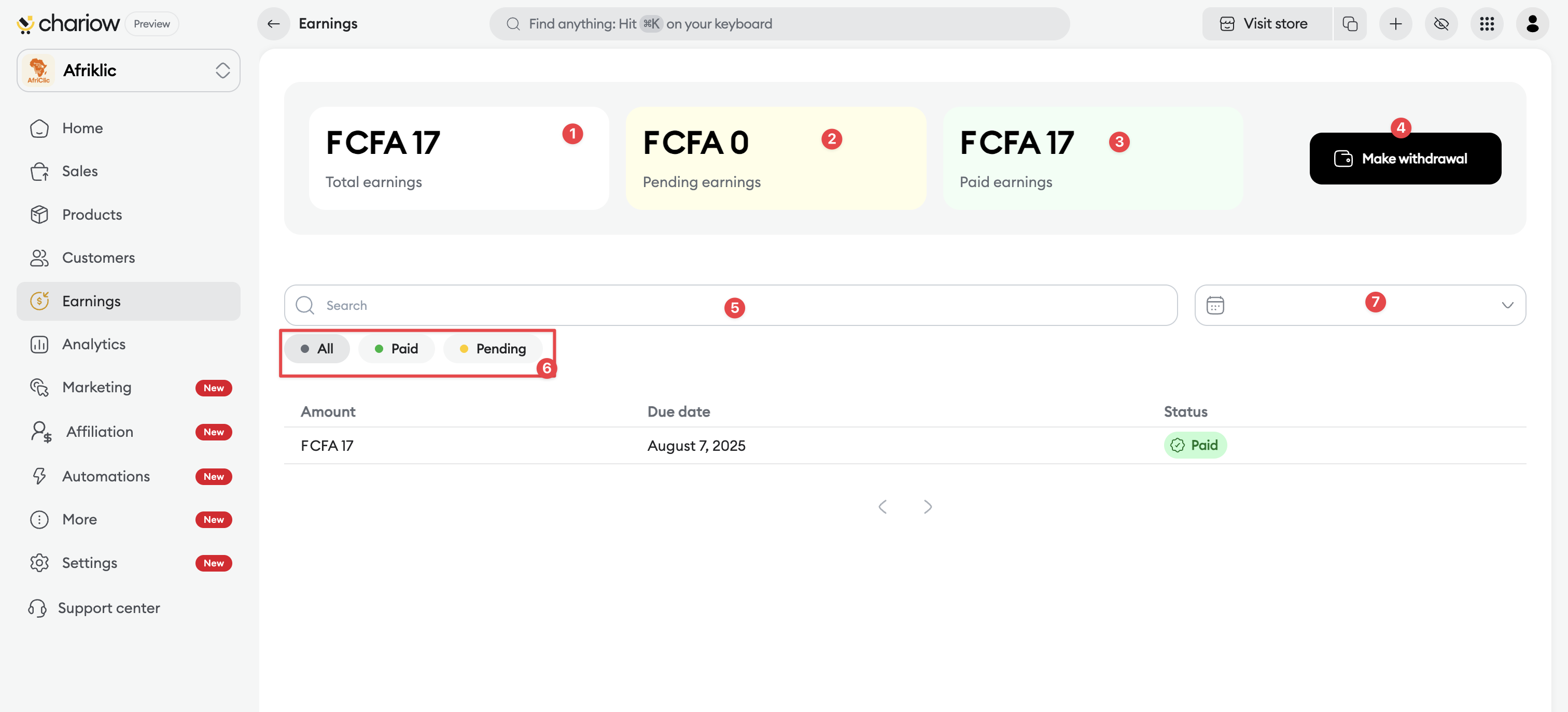
Total earnings (1) : The total amount of all your sales.
Pending Earnings (2): The total amount pending transfer to your Wallet.
Paid earnings (3) : The total amount credited to your Wallet.
Make withdrawal (4): A quick button to take you to your Axa Zara Wallet, where you can manage your funds and initiate withdrawals.
Search Bar (5): To find specific transactions.
Filters (6 and 7): Options to filter your transactions by status (e.g., "Pending," "Paid") or by time period, to help you refine your analysis.

By clicking on a transaction line, a detailed window will open on the right, showing:
The transaction ID and the date the earning was added.
The amount, the date of the sale, and the date the amount is due/paid.
A summary of total sales, total amount, applied discounts, and service fees.
The earning reference number in your Wallet.
The details of the sales grouped within this earning entry.
Your earnings follow a clear process before they are available for withdrawal:
Daily Grouping: All successful sales from one day are grouped into a single amount, which becomes available the next day in the Earnings section.
Transfer to Wallet: This amount is then automatically transferred to your Axa Zara Wallet within a maximum of 72 hours after the sale. This verification period is a crucial security measure to prevent fraud and ensure reliable transactions.
Mobile Money Withdrawal: Once the funds are available in your Axa Zara Wallet, you can initiate a withdrawal to your Mobile Money account (MTN, Orange, Wave, Moov, etc.). The minimum withdrawal amount is $1. Withdrawal requests are usually processed in a few hours but can take up to 72 hours.

Need help? Contact our support via the chat or at [email protected]