Welcome to Chariow! You’ve just taken a key step to boost your creator business. This help center guides you through your interface so you can get started quickly and efficiently. Explore all the resources and features to create, manage, and optimize the sale of your products.
As soon as you log in, you land on your general Overview. This is the control center where you track your key performance metrics:
Financial indicators: See your Total revenue and your revenue from the last 7 days.
Customer base: Track the total number of customers who have trusted your store.
Top Products: Identify your best-selling products so you can adapt your strategy.
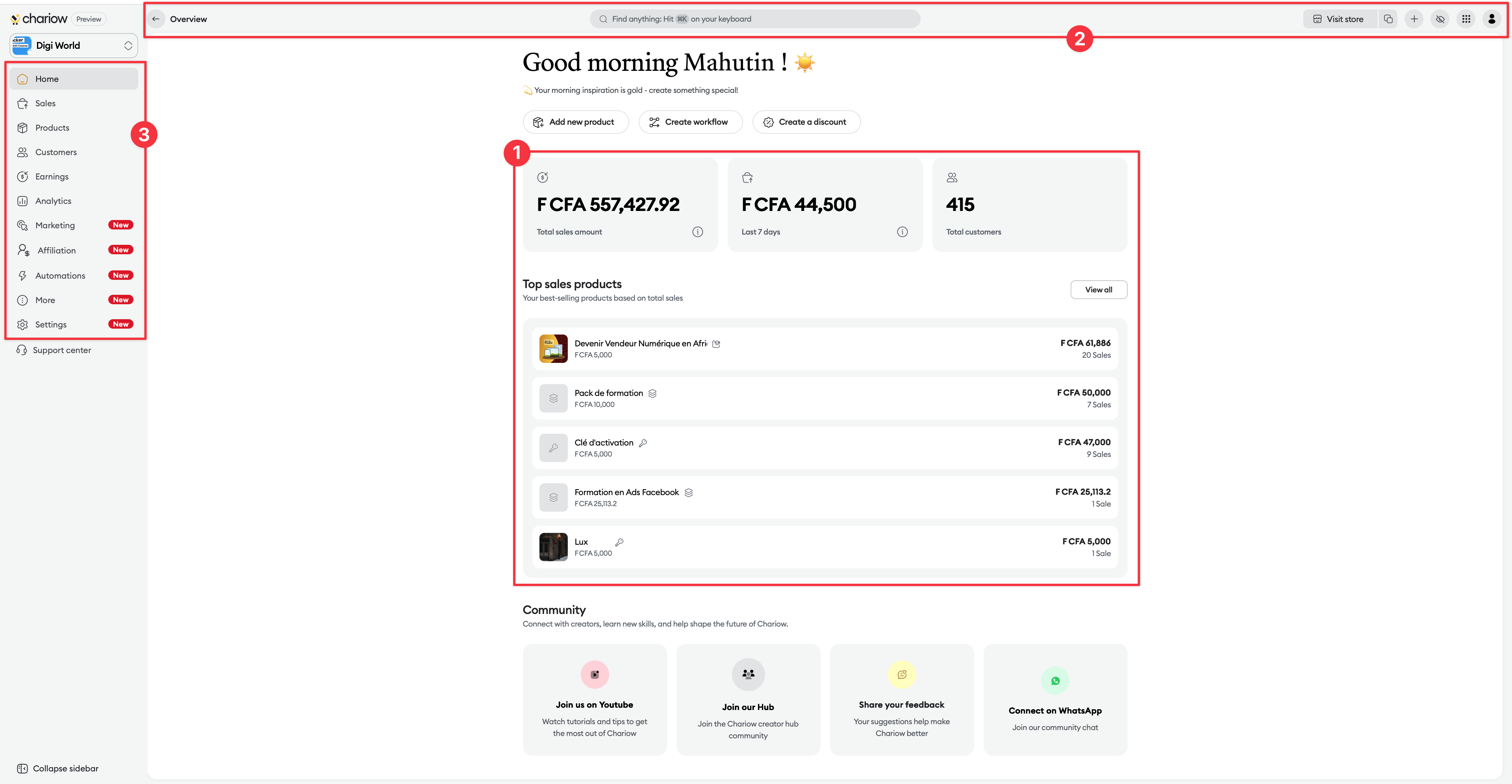
To boost your productivity and protect your data, Chariow includes smart tools at the top of your screen:
Universal Search (⌘K / CTRL+K): Find a tool or perform an action (e.g. "Create a product") without browsing through the menus.
"+" Button (Quick Action) : A contextual menu to instantly launch your frequent tasks (Product, Workflow, Discount, Snap).
Privacy Mode (Eye icon) : Instantly hide all your sensitive data (revenue, sales, customer emails) on any page. Perfect for working in public or sharing your screen.
App Switcher ("Waffle" Icon) : Switch in a second to other products in the Axa Zara ecosystem like Account, Wallet, Affiliate or Zeyow.
Your interface is organized into clear sections to manage every part of your business:
Sales : The detailed log of every successful, failed, or abandoned transaction.
Products : The core of your business. Access your catalog here, edit it, or add new offers.
Revenue : Track your earnings and download your financial statements.
Customers : Manage your database and analyze your buyers’ behavior.
Marketing : Create promos and tools to boost your visibility.
Affiliates : Recruit partners to sell your products for a commission.
Automation : Set up your Workflows (after-sales), your Tasks (scheduled bulk actions), your Integrations, etc.
Plus : This section brings together powerful features to enhance your store:
Reviews : Manage your customers’ ratings to boost your credibility.
Licenses : Manage your activation keys (ideal for software).
Spotlights : Turn your testimonials into visual social proof.
Media : Centralize and organize all your digital files.
Statements : Generate your PDF accounting documents for your payments.
Settings : The foundation of your store (Brand identity, domains, legal documents...).
Set up your store : Customize your visual identity in the Settings.
Organize your Media : Centralize your images and files in the More > Media tab.
Join the Community : Find our Hub, YouTube and WhatsApp links at the bottom of your dashboard to connect with other creators.
At the top right, click on your Profile to manage your personal information, change the interface language, or log out.
Our help center is available at every step. If you can't find your answer, our support team is here for you via chat or at [email protected].

